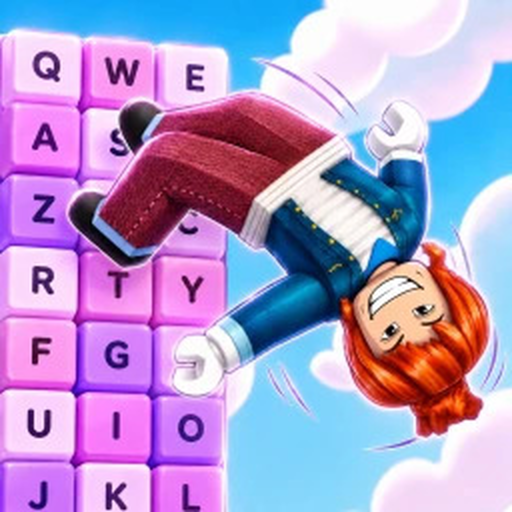
Backflip Keyboard Escape Roblox Wiki & Player Guide
Use this Backflip Keyboard Escape Roblox wiki for verified gameplay, Speed progression, keyboard-course tips, World 2 facts, rewards, and official links.
Backflip Keyboard Escape at a glance
Backflip Keyboard Escape is a Roblox simulation and incremental experience built around a direct loop: perform backflips to gain Speed, then use that progress while flipping and jumping across a keyboard-shaped escape course. The official listing describes candy and chocolate keyboard keys, unlockable multipliers, competition with friends and other players, and the risk that one wrong move can send a player back to the start. The public root place is Roblox place 102553576537621, and the creator is the FRONTFLIPPERS group.
The current Roblox title was observed as [X2] +1 Backflip Keyboard Escape on July 31, 2026. The bracketed prefix is promotional wording and can change, so this wiki uses the stable search name Backflip Keyboard Escape. It does not interpret the prefix as a permanent rule or claim how any promotion stacks. The official Roblox experience is the final source for the live title, server status, and current interface.
| Field | Verified information | Boundary |
|---|---|---|
| Platform | Roblox | Use the official experience link |
| Creator | FRONTFLIPPERS | Roblox community group 697469702 |
| Genre | Simulation | Subgenre listed as Incremental Simulator |
| Server size | 22 players | Listing value at collection time |
| Root place | 102553576537621 | Public starting experience |
| Additional place | World 2, place 77764718018334 | Access requirement is not verified |
Core gameplay and Speed progression
The verified core loop begins with backflips. The official description states that a backflip adds +1 Speed. Players train that Speed, move onto the keyboard obstacle course, and pursue an escape while competing for faster runs. The game also advertises unlockable multipliers, but the collected evidence does not establish their exact values, prices, formulas, or the mathematically optimal purchase order. Those are live-game details, not safe constants for a permanent wiki page.
A practical session can therefore be organized around repeatable observation. First, check the Speed value before and after a normal backflip so you understand the current feedback. Next, approach the course at a pace that lets you read the landing surface. If a run fails, return to training or adjust your timing before making several other changes. Finally, compare similar runs rather than treating a single fast attempt as proof of a permanent strategy.
- Use backflips to build the Speed resource described by the game.
- Read the next keyboard key before committing to a jump.
- Change one variable at a time when testing timing or movement.
- Treat multiplier costs and effects as update-sensitive live values.
- Keep the objective simple: progress farther without falling back to the start.
The game supports multiplayer racing, so another player can be a useful pace reference. However, their visible movement does not prove that the same route, upgrade level, device input, or latency will work for you. Use races as feedback, not as an unverified tier list.
The keyboard escape course
The official course is presented as a world of candy and chocolate keyboard keys. Its verified goal is to flip, jump, and escape. The available sources do not provide a complete key-by-key map, checkpoint list, control binding chart, or obstacle timing table. That boundary matters: a responsible Backflip Keyboard Escape Roblox wiki should not label imagined shortcuts as real stages.
For a safer course attempt, center your camera so the landing area is visible and give yourself room to correct direction before the edge. Watch the full motion of a repeating obstacle when one is present in the live build. Commit only after you can identify the next safe surface. After a fall, remember the official warning that a wrong move sends the player back to the start; no collected evidence confirms checkpoints that would override that rule.
| Moment | Reliable action | What remains update-sensitive |
|---|---|---|
| Before a run | Train Speed and inspect the first landing | Recommended Speed threshold |
| At an edge | Aim at a visible key and avoid rushed input | Exact jump distance |
| Near an obstacle | Observe a full pattern before moving | Stage layout and timing |
| After a fall | Identify the failed input before retrying | Checkpoint behavior |
| During a race | Prioritize a repeatable line | Opponent upgrades and latency |
World 2 is present as an additional Roblox place with ID 77764718018334. The evidence does not establish its access requirement, order in progression, or whether a current server sends every player there in the same way. Check the live portals, menus, and requirement text rather than following a numeric threshold copied from an older video.
Rewards, multipliers, and update boundaries
Two public reward messages are verified. The creator description offers a free in-game gift for joining the FRONTFLIPPERS group, but the contents of that gift are not documented in the collected sources. The description also advertises X3 multipliers on weekends, while the precise schedule, time zone, eligible systems, and stacking behavior remain unknown. Read the live game banner and reward panel before making a plan around either offer.
The official listing showed a public update date of July 27, 2026, but it did not include a complete changelog. At collection time, it also listed an event named UPDATE 3 + ADMIN ABUSE scheduled for August 1, 2026. An event listing proves that the event was advertised; it does not prove every feature, reward, or balance change associated with it. This site will not turn that title into an invented patch list.
There are currently no verified active or expired redemption-code strings in the approved fact collection. A video title that claims to show codes is not enough to promote those strings as current. Visit the Codes page for the site’s last-check boundary and use the live game result as the final authority.
When the game changes, use this order of trust:
- Read the live Roblox experience description and in-game interface.
- Check the official FRONTFLIPPERS community destination.
- Treat dated creator videos as gameplay examples rather than patch notes.
- Reject pages for similarly named Roblox experiences with different place IDs or creators.
- Avoid scripts, exploits, and “auto win” claims; they are outside this site’s safe scope.
A reliable player route
Begin by opening the correct Roblox experience and confirming the FRONTFLIPPERS creator name. Perform a few normal backflips and observe the Speed feedback. Then make a controlled first course attempt, focusing on clear landings instead of maximum pace. After each failure, identify whether the issue was alignment, timing, camera visibility, or excess momentum. This process is slower for one attempt but faster for learning because it produces a specific adjustment.
Once you can repeat an early section, compare a run before and after one visible progression change. Do not copy exact costs from this article; enter the current amount and cost into the site calculator if you want transparent budget math. When a multiplier becomes available, read its live label and decide whether it supports the route you are actually attempting. If World 2 appears as a destination, follow the live requirement instead of assuming an unlock number.
Players who want a shorter route can use the Beginner Guide. The How to Play page expands the basic loop, while How to Finish Stages focuses on observation and recovery without pretending to know every stage layout. The Secrets Guide explains what is verified, what remains unknown, and how to test a rumor without risking an account or publishing false information.
FAQ
What is Backflip Keyboard Escape on Roblox?
It is a Roblox incremental simulation where backflips add Speed and players flip and jump across a candy-and-chocolate keyboard course toward an escape, with multiplayer racing also advertised.
Who made Backflip Keyboard Escape?
The official Roblox listing attributes the experience to FRONTFLIPPERS, Roblox community group 697469702.
Does every backflip give +1 Speed?
The official description states “+1 Speed Every Backflip.” Promotions and multipliers may affect the live display, so verify the current result in your server instead of assuming a permanent stacking formula.
Is World 2 confirmed?
Yes. An additional place named World 2 is associated with the experience, with place ID 77764718018334. Its current unlock requirement was not verified in the collected evidence.